InstaLayers - superimpose, montage for Instagram -9.0.0
Publisher Description
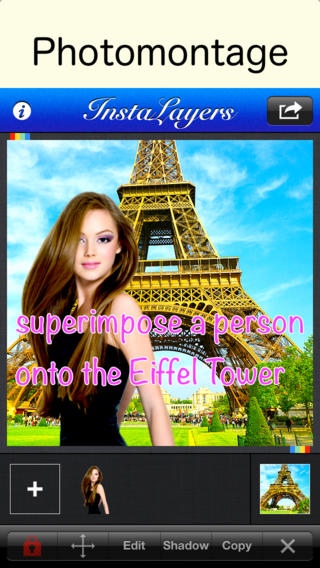
This is an application
for making beautiful photomontages
and share them on Instagram.
Very easy interface
Various functions
Shadow editting
Background Eraser
Feathering ( Softening image edges )
"Feathering" function is very useful to create beautiful composite images.
Output size is 612 x 612 ( Instagram size ).
Main Features
4 layers and 1 background image can be superimposed at the same time.
Layer selector
Background Eraser with Auto mode
Saving images processed by Background Eraser
Feather ( Softening image edges )
Cropping image before importing
Adjusting brightness contrast saturation
Adjusting Transparency
Move, rotate, resize images
Flip images
Lock images
Accurate movement
Add Shadow
Move, rotate, resize shadow
Shadow color
Duplicate images
Reset images
Requires iOS 8.0 or later. Compatible with iPhone, iPad, and iPod touch.
About InstaLayers - superimpose, montage for Instagram -
The company that develops InstaLayers - superimpose, montage for Instagram - is handyCloset Inc.. The latest version released by its developer is 9.0.0.
To install InstaLayers - superimpose, montage for Instagram - on your iOS device, just click the green Continue To App button above to start the installation process. The app is listed on our website since 2012-08-13 and was downloaded 20 times. We have already checked if the download link is safe, however for your own protection we recommend that you scan the downloaded app with your antivirus. Your antivirus may detect the InstaLayers - superimpose, montage for Instagram - as malware if the download link is broken.
How to install InstaLayers - superimpose, montage for Instagram - on your iOS device:
- Click on the Continue To App button on our website. This will redirect you to the App Store.
- Once the InstaLayers - superimpose, montage for Instagram - is shown in the iTunes listing of your iOS device, you can start its download and installation. Tap on the GET button to the right of the app to start downloading it.
- If you are not logged-in the iOS appstore app, you'll be prompted for your your Apple ID and/or password.
- After InstaLayers - superimpose, montage for Instagram - is downloaded, you'll see an INSTALL button to the right. Tap on it to start the actual installation of the iOS app.
- Once installation is finished you can tap on the OPEN button to start it. Its icon will also be added to your device home screen.
